Features
Everything your sites need, from one place.
YOLO Cloud runs on top of the free YOLO plugin. It mirrors the plugin’s wp-admin for every site you connect, then adds what only a service can: off-site backups, monitoring, proof on every update, AI fixes that wait for your yes, and tools for agencies and teams.
One console per site
Every site’s wp-admin, mirrored.
Each connected site gets a console that mirrors the YOLO plugin’s own screens. Read the state, then act on it, without opening wp-admin.
Plugins, themes & updates
See what’s installed and active. Update, activate, deactivate or switch themes, and apply WordPress, plugin, theme and translation updates.
Monitor in one place
Health, security findings, PHP errors, auto-fix proposals, the activity feed and performance, grouped together for each site.
Extensions, kits & conflicts
Manage the site’s AI-built extensions and kits, and resolve edits that clashed instead of losing one silently.
Environment at a glance
PHP and WordPress versions, memory and server details, with a badge when something is outside the recommended range.
Sites you can’t reach directly
A site behind a strict firewall, or on localhost, connects through the Agent: it calls out to us for work, so nothing has to be opened up.
Tag, search & favourite
Label sites by client, environment or anything else, then filter, search and pin the ones you open most.
Updates with proof
Update everything. See what changed.
Updates are the job you do most, so they get the most care: bulk runs, a health check on every plugin, theme and core update, and screenshots that show what each update did to the site.
Bulk updates
Update one site or many in a single run, tracked as a job with a clear result for every site.
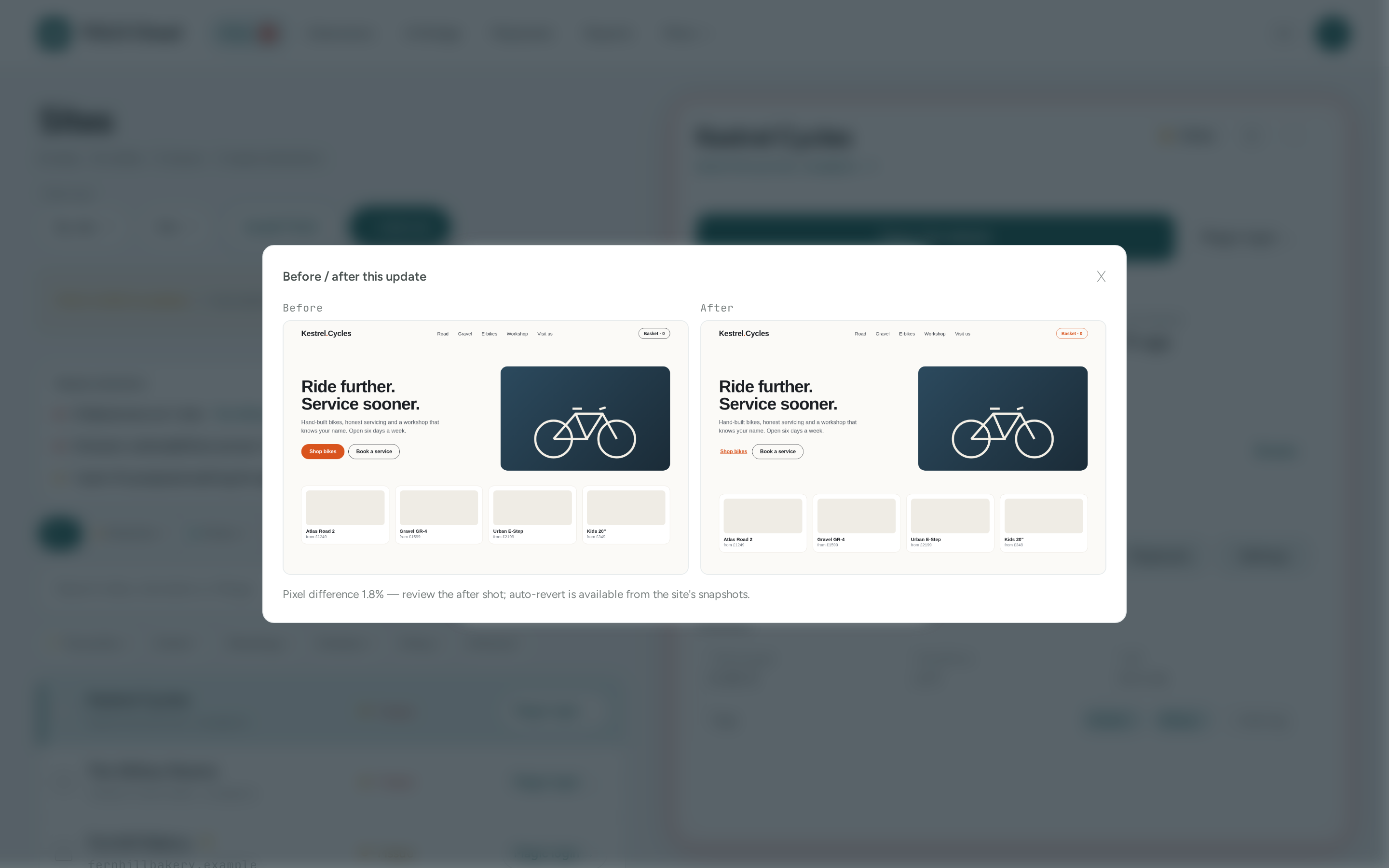
Before/after screenshots
Update jobs screenshot the site’s home page before and after, then show how much changed, so a broken layout doesn’t go unnoticed.
Auto-rollback
Plugin and theme updates, activations and theme switches are health-checked and reverted if they take the site down. WordPress core updates are health-checked and reported.
Translations included
Language-pack updates are counted on each site and applied along with Update all.
Update YOLO itself
When a new YOLO release is out, each directly connected site shows it and updates from here in one click. The package is checked to be a valid plugin before the old copy is replaced. Agent-connected sites update from their own wp-admin.
Off-site backups
Backups that don’t live on the same server.
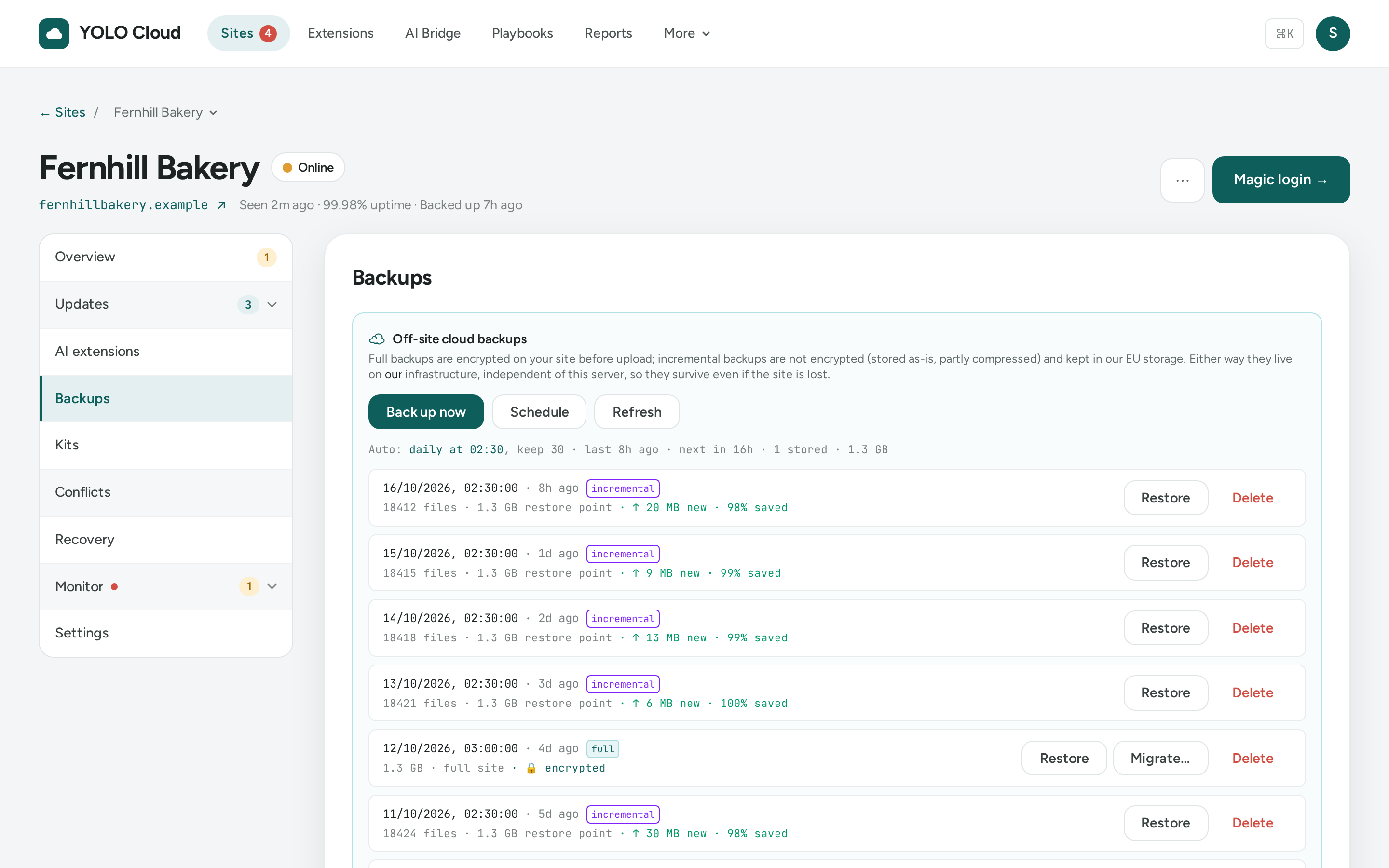
A backup on the server that just failed is no backup. YOLO Cloud keeps restore points in our object storage in Germany, on the schedule you choose.
Scheduled, off-site
Daily or weekly, at a time of day you pick in your own timezone, keeping up to 60 restore points. Or back up now.
Full backups encrypted on your site
Full backups are sealed on the site with your account’s own key before they’re uploaded, so our storage only ever holds the encrypted file.
Incremental, if you prefer
Incremental mode uploads only what changed since last time, so you can keep a long history cheaply. Incremental backups are not encrypted.
Restore in a click
Put a site back to any restore point. The plugin takes a safety backup first. Restoring needs the connection to allow writing code and installing plugins.
Copy onto another site
Restore a backup onto a different connected site, such as staging to live, with addresses rewritten for the new domain.
Break-glass recovery
When a site white-screens and wp-admin is gone, bring it back into safe mode from here, then restore a good backup. Set up the site’s emergency recovery key in wp-admin and save it in Cloud beforehand.
Watch & fix
Trouble spotted early. Fixed fast.
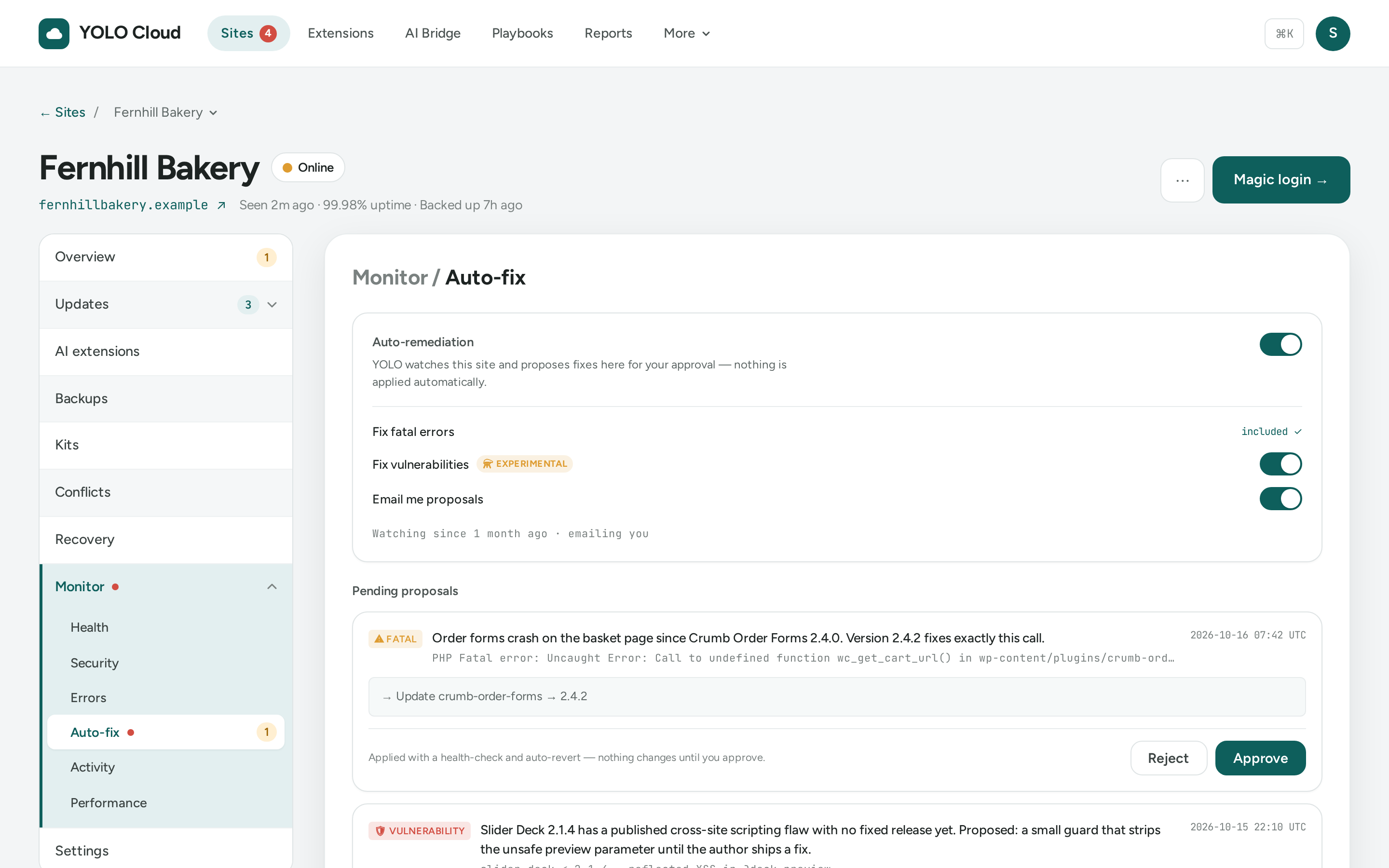
Every site is checked for downtime, known vulnerabilities, slow pages and PHP errors. The error watch explains a crashing plugin and suggests a fix; nothing changes until a person approves it.
Uptime
Each site is checked on a schedule, with a downtime history and response times you can trust.
Security scan
Plugins and themes are checked daily against a public vulnerability database. Affected sites are flagged, with a one-click update when a fixed version exists.
Performance
Google PageSpeed scores, Core Web Vitals and the biggest opportunities for each site, tracked over time.
Error watch
New PHP fatal errors are recorded and explained by AI, with a suggested fix such as an update. The watch never changes a site by itself: you update or switch off the plugin with one click.
Auto-fix, with approval
Off until you switch it on for a site. The AI proposes the safest fix it can, such as an update or a small patch. An owner or admin approves it, then Cloud applies it and checks it worked.
Alerts that reach you
Opt in to emails for downtime and recovery, available updates and fix proposals, plus a weekly digest.
AI Bridge
Chat to manage a site. Ask about all of them.
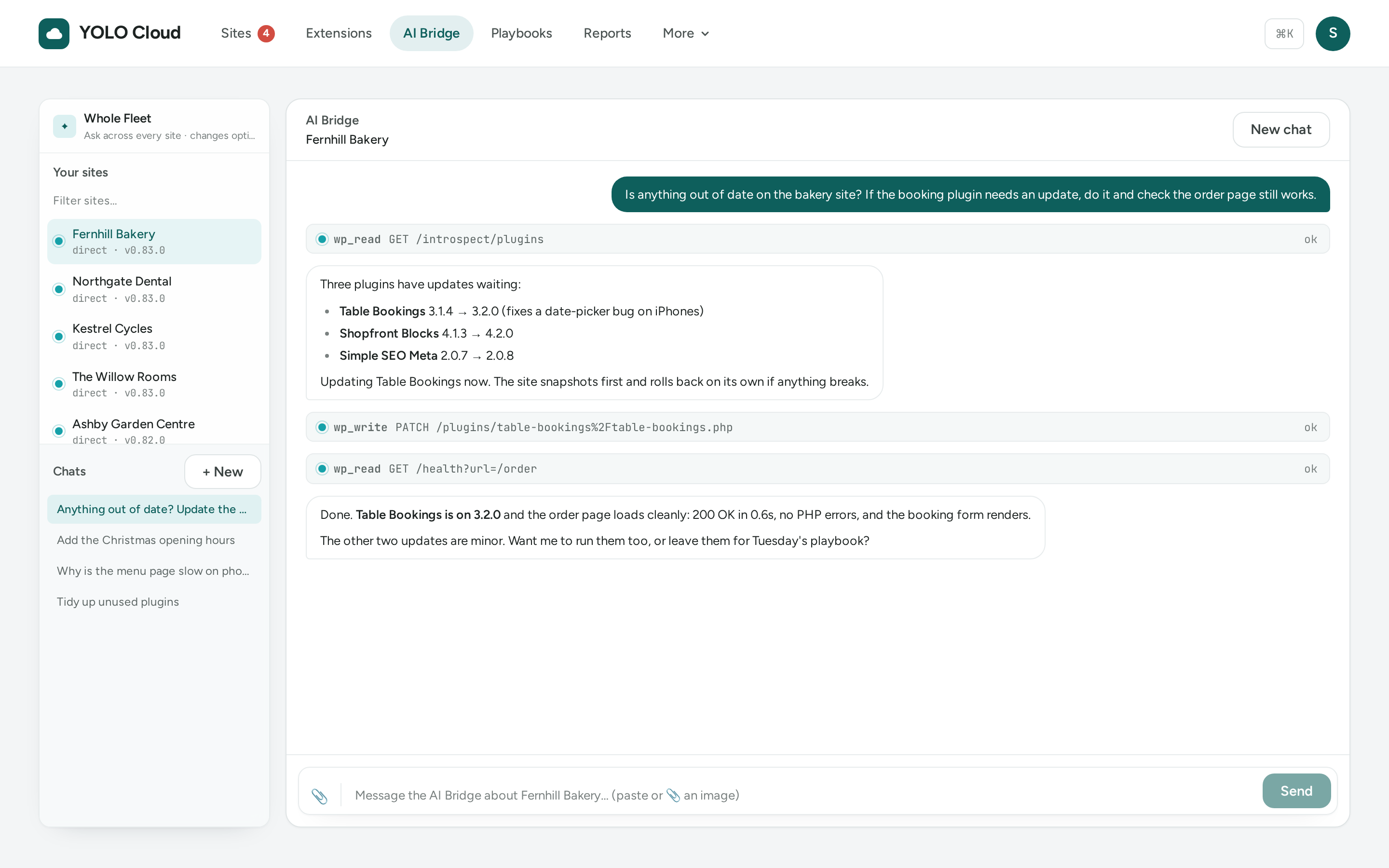
The AI Bridge works through the YOLO plugin, so its changes get the same safety net as yours: snapshots and undo for content, design and settings, and auto-rollback for updates and activations.
Chat to manage a site
Describe what you want. The AI Bridge reads the site, makes the change through YOLO, checks the result and tells you what it did.
Ask your fleet
Ask a question across every site at once, like which sites still need an update or which run an old PHP version. Read-only unless you allow changes.
Grounded in the real docs
It works from the plugin’s own guide and current library documentation, not from what a model half-remembers.
Show it a screenshot
Attach a screenshot or photo of an error and it reasons about what it sees.
Pick up where you left off
Conversations are saved, so you can come back to one later.
Library & extensions
Build it once. Use it on every site.
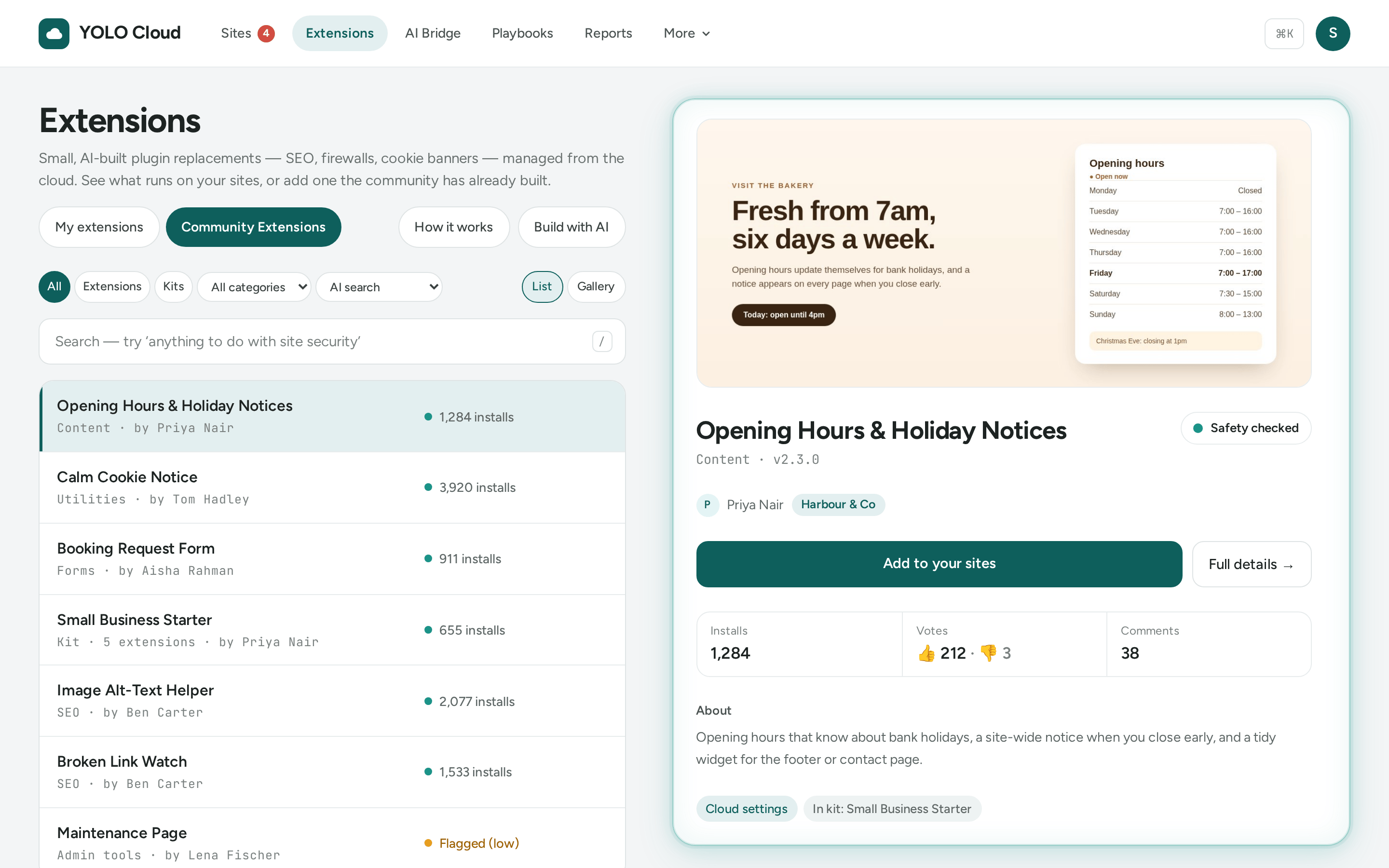
Extensions the AI builds with YOLO are small and focused. Cloud lets you reuse them: copy them between your sites, share them with everyone, and manage their settings in one place.
Kits & sharing
Copy an extension or a whole kit from one site to many, or import one from a share link. These need the site connected to Cloud.
Community Library
Publish an extension, or find someone else’s by keyword or by describing what you need.
AI safety scan
Every published extension is scanned by AI for malicious or dangerous code and badged before anyone installs it.
Re-Mix
Improve someone’s extension and submit it back as a credited variant of the same entry. Nobody can republish another creator’s work as their own.
Settings, pushed to every site
When an extension declares settings, Cloud shows them as a form. Set them once, preview the change per site and apply. Secrets are encrypted and never shown back.
Updates when you’re ready
Sites are told when an extension they use has a new version. Nothing is updated without you.
Agencies & teams
Run other people’s sites like a studio.
Organise sites by client, show clients the work in a report with your name on it, bring your team in with the right access, and let routine work run itself.
Clients
Keep a record for each client and group their sites under it.
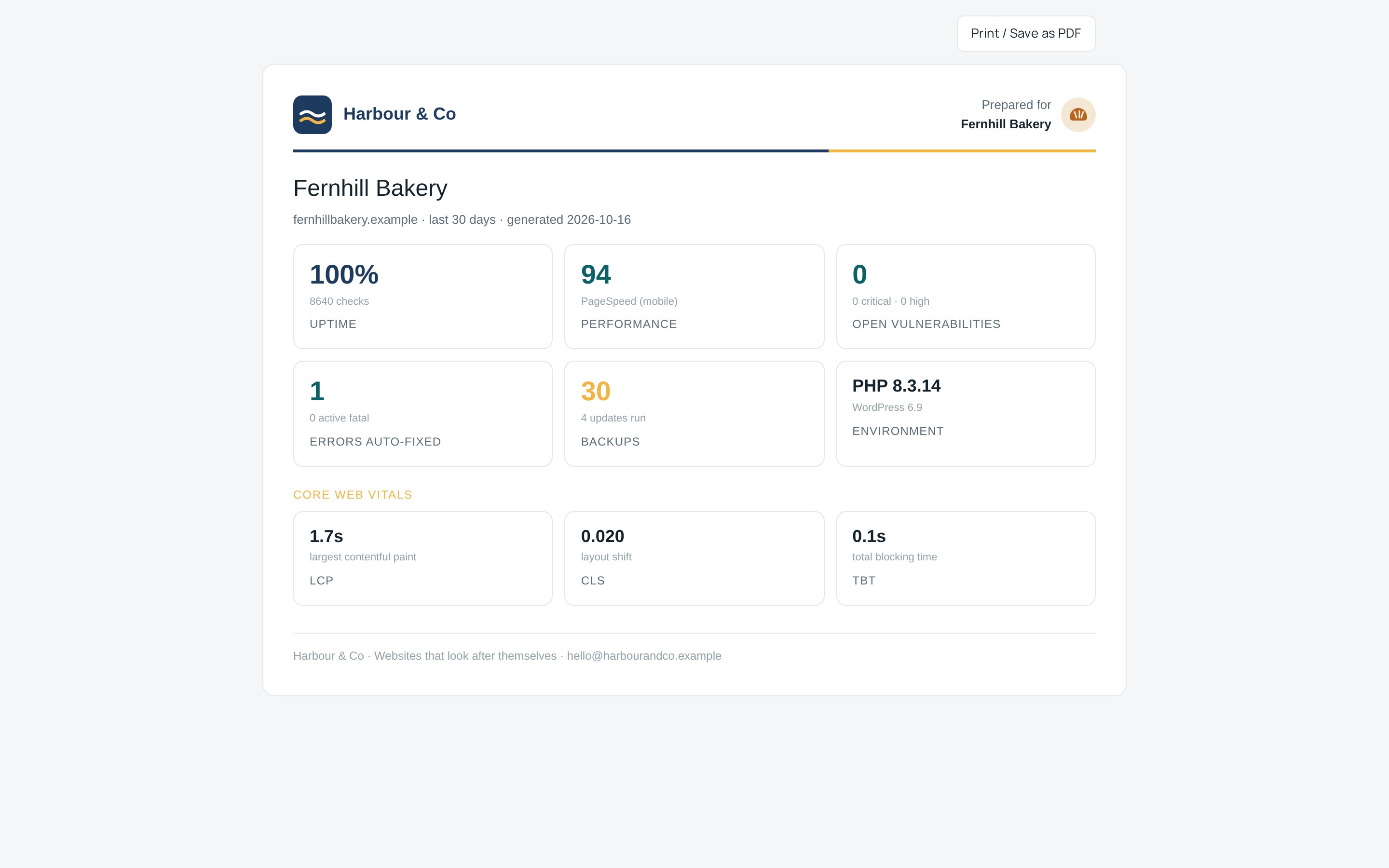
White-label reports
Share a report link per site, or one for all of a client’s sites, with your logo and theirs: uptime, security, performance and the updates you applied. Print it to PDF when you need a file.
Teams & roles
Invite people as owner, admin, member or viewer. Viewers can look but never change anything, which suits clients and new starters.
Workspaces
Belong to several teams and your own personal workspace, switch between them, or share one site into another workspace.
Playbooks
Chain steps such as back up, update, health-check and AI tasks into a routine, run it on a schedule across the sites you choose, and get the report by email.
Access & security
Easy to connect. Hard to get into.
Getting a site in should take a minute. Getting into your account should take more than a password.
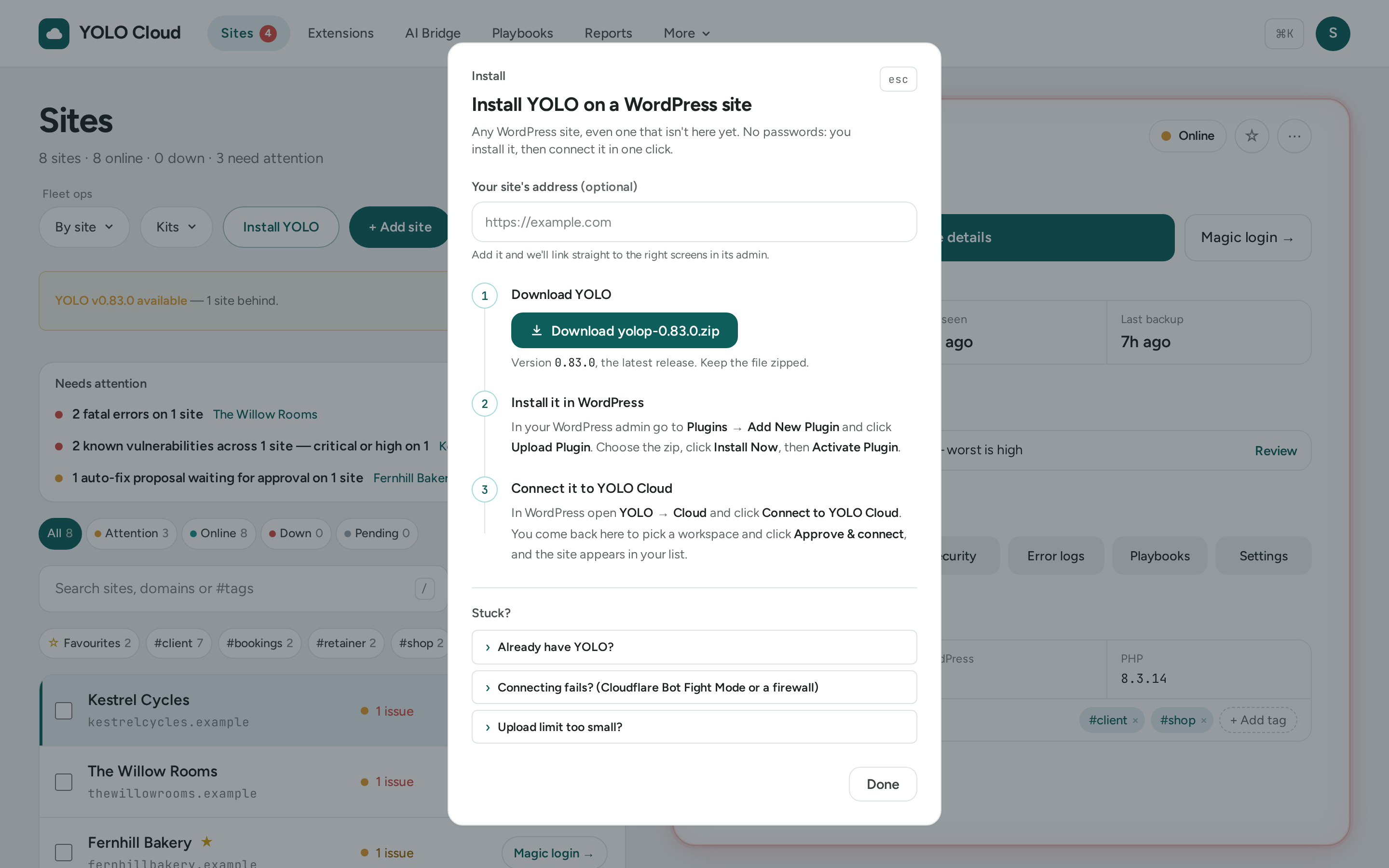
Install YOLO
The Sites page has an Install YOLO button: download the latest plugin and follow the three steps to upload, activate and connect it.
One-click connect
In WordPress, open YOLO → Cloud and click Connect to YOLO Cloud, then approve it here. No keys to copy and paste.
Magic login
Open a site’s wp-admin from its console with a single-use link that expires in minutes. No shared passwords, and every use is logged. Needs plugin installs allowed for the connection (and, on YOLO 0.85.0 or later, switched on in the site’s YOLO settings), and works for sites connected directly, not through the Agent.
Sign-in your way
GitHub, Google, or email and password, protected by Cloudflare Turnstile.
Two-factor
App-based two-factor with recovery codes, required at every sign-in once it’s on, including through GitHub and Google.
You decide the riskiest access
When you approve a connection you choose what Cloud may do; everything starts ticked, so untick writing code and installing plugins if you don’t want them. Not granted, Cloud can’t turn them on; only wp-admin can. Granted, treat it as full control: installing plugins also allows magic login.
Start with one site
Connect a site in a click. Rarely open wp-admin again.
Install YOLO from the Sites page, click Connect to YOLO Cloud in WordPress, approve it here, and the whole site is yours to run from one place.